The Freelancer's Guide to Painless Invoicing
Freelancers don't need accounting software — they need a professional invoice out the door minutes after finishing a project, and a clear view of who hasn't paid. A free invoice app like PocketInvoice handles both from your phone: 100+ templates, saved services, PDF export, and payment tracking with due-date reminders.
Look professional from invoice #1
Clients judge polish. An invoice with clean typography, your logo, and consistent branding signals that you run a real business — and gets processed faster by whoever pays it. PocketInvoice ships with 100+ templates; pick one, set your accent color, drop in your logo and signature, and every invoice you send looks like it came from a studio.
Save your services once, invoice in three taps
Build your service list one time: "Logo design — $450", "Hourly consulting — $90/hr", "Blog post — $200". Next invoice, you pick the client, tap the services, and send. Rates stay consistent across clients, and you never fumble for what you charged last time.
Track unpaid work without a spreadsheet
The silent killer of freelance cash flow is the invoice nobody followed up on. PocketInvoice shows totals for paid and unpaid work, flags overdue invoices, and reminds you when due dates pass — so the awkward "just checking in" email goes out on day one of overdue, not day thirty.
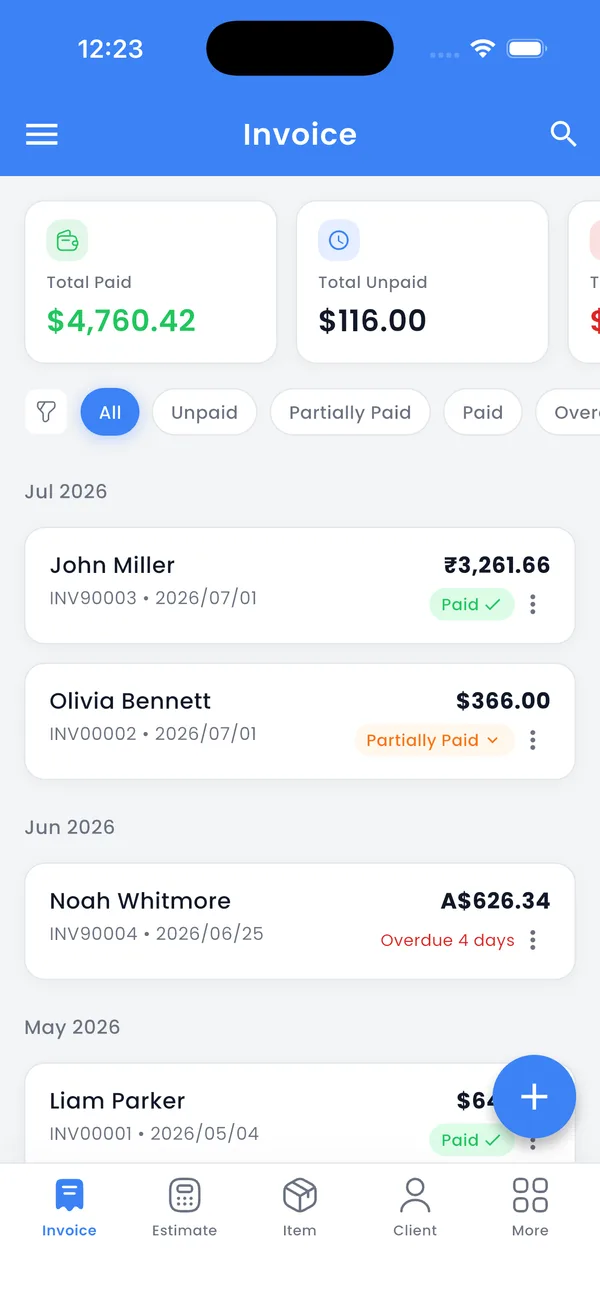
Invoice international clients
Working with clients abroad? PocketInvoice supports multiple currencies and date formats, so a US client gets $ and MM/DD/YYYY while a UK client gets £ and their local format — and you can save VAT or any other named tax rate a client's invoice needs.
Be ready for tax season
Every invoice you send is a record. Reports show revenue over time and per client, and a ZIP export backs up everything — handy when you (or your tax preparer) reconcile income at year end. It's not tax software, but it keeps the paper trail complete.
A freelance invoicing rhythm that works
- Deliver the project → send the invoice the same day, from your phone.
- Set a due date (7, 14, or 30 days — shorter is fine for freelance work).
- Mark payments as they land; check the unpaid list every Friday.
- Month end: glance at the revenue report; export a backup.
Send your next invoice in a minute
PocketInvoice is free for freelancers — professional templates, payment tracking, no account.


FAQ: Freelance invoicing
What's a good free invoice app for freelancers?
PocketInvoice's free plan fits freelance work well: professional invoices and estimates every month, PDF export, payment tracking, and no account. Premium adds unlimited invoices and the full template library.
Do my clients need the app to receive invoices?
No. Clients receive a standard PDF (or image) by email, WhatsApp, or however you share it — it opens on any device with nothing to install.
Can I invoice in different currencies?
Yes. Choose the currency and date format per your needs — useful when you bill clients in different countries.
Is this enough for freelance taxes?
It keeps your income records complete: every invoice, payment status, and revenue reports you can export. For filing itself, hand those records to your tax software or preparer.