Free Invoice Maker App: What You Actually Get
PocketInvoice is a free invoice app and invoice maker for iOS and Android. The free plan gives you 3 invoices and 3 estimates every month, PDF export with no watermark, around 20 templates, and payment tracking. There's no subscription to start, no account, and it works completely offline.
What's free in PocketInvoice — honestly
Most "free" invoice apps bury their limits. Here is exactly where the free plan ends and Premium begins:
| Feature | Free plan | Premium |
|---|---|---|
| Invoices | 3 per month | Unlimited |
| Estimates | 3 per month | Unlimited |
| Templates | ~20 designs | All 100+ designs |
| Saved clients | 3 | Unlimited |
| Saved items | 3 | Unlimited |
| Business profiles | 1 | Multiple |
| PDF & image export | Included | Included |
| Watermark or app branding on PDFs | None | None |
| Payment tracking & reports | Included | Included |
| Works offline, no account | Included | Included |
If you bill a couple of clients a month, the free plan covers you indefinitely. If invoicing is a weekly thing, Premium removes the caps.
Do you need a subscription to use it?
No. You can download PocketInvoice and send invoices without ever subscribing. During setup the app shows the Premium options once — close that screen and you go straight to the free plan. You don't have to start a trial or add a payment method.
Premium is optional. If you choose it later, it's billed through the App Store or Google Play, and you can cancel any time from your store account's subscription settings. Your invoices, clients, and items stay on your phone either way.
How to make your first free invoice
- Install PocketInvoice — it opens directly with no sign-up.
- If the Premium screen appears, close it to continue on the free plan.
- Add your business name, contact details, and logo.
- Create an invoice: client, line items, tax.
- Pick one of the free templates and add your accent color.
- Export the PDF and share it by email or WhatsApp.
Full walkthrough: how to make an invoice on your phone.
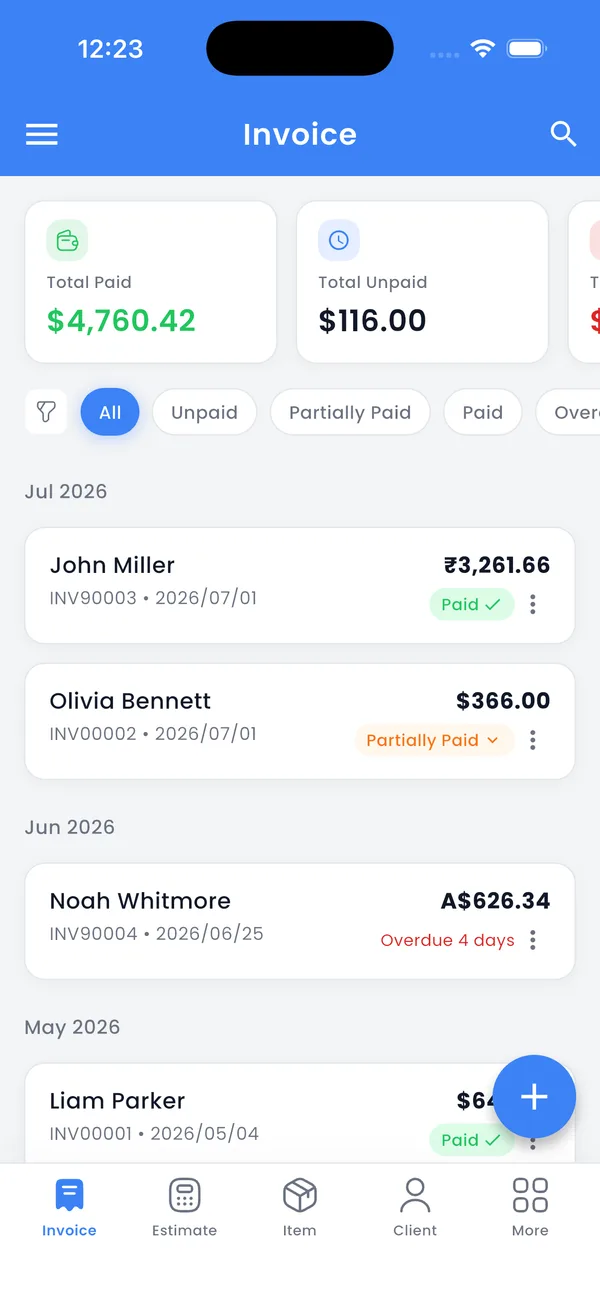
A free invoice app for Android and iOS
The free plan is identical on both platforms: same limits, same templates, same offline storage. What changes is only the share menu your phone shows when you send the finished PDF.
- On Android (7.0 or later): share to WhatsApp, Gmail, Google Drive, or any app in the Android share menu, and print with Android's built-in printing.
- On iOS: share to Mail, Messages, WhatsApp, or Files, and print to any AirPrint printer.
Using an Android phone? See the full invoice app for Android guide.
The four kinds of "free" invoice apps
"Free" means very different things in invoice apps. Knowing which kind you're installing saves you a surprise later:
| Type | What's free | The usual catch |
|---|---|---|
| Free trial | Everything, for a few days | Stops working until you pay |
| Free with ads | Unlimited invoices | Ads in the app, sometimes branding on your invoices |
| Online invoice generators | Invoices in a web browser | Needs internet, often a watermark, your data sits on their servers |
| Free plan (PocketInvoice) | 3 invoices + 3 estimates a month, forever | Monthly limits — no ads, no watermark |
What to check in any free invoice app
- Where your data lives. Many free apps upload your client list and revenue to their servers. PocketInvoice stores everything on your device only.
- Whether it needs an account. A forced sign-up usually means marketing emails. PocketInvoice has none.
- Whether export is free. Some apps let you build an invoice, then charge to send it. PDF export is included in PocketInvoice's free plan.
- Whether free invoices carry a watermark. A "made with" stamp on your invoice looks unprofessional to clients. PocketInvoice's free PDFs have none.
- Whether it works offline. If the app needs a connection to open, it will fail exactly when you need it on site.
When free is enough — and when it isn't
The free plan fits side businesses, occasional freelance work, and anyone testing whether an invoicing app fits their workflow. Once you're sending invoices every week, managing more than a few clients, or want the full template library, Premium is the upgrade path — but the app never forces it to keep your existing data accessible.
Try the free plan — no account needed
Download PocketInvoice and send a professional invoice today. Free on iOS and Android.


FAQ: Free invoice maker
Is PocketInvoice really free?
Yes. The app is free to download and the free plan is free forever: 3 invoices and 3 estimates every month, PDF export, templates, and payment tracking. Premium is an optional subscription that removes the limits.
Is there a free invoice app with no subscription?
Yes. PocketInvoice's free plan needs no subscription, no trial, and no payment method. You can close the Premium screen during setup and keep invoicing on the free plan.
Do free invoices have a watermark?
No. Invoices and estimates made on the free plan are exported as clean PDFs with no watermark and no app branding, so they look exactly like Premium invoices.
Is the free plan the same on Android and iOS?
Yes. The free limits, templates, and features are the same on both. The only difference is the share menu each phone shows when you send the PDF.
Do I need to create an account to use it?
No. PocketInvoice has no sign-up, no login, and no cloud account. You open the app and start invoicing.
What are the free plan limits?
3 invoices and 3 estimates per month, 3 saved clients, 3 saved items, 1 business profile, and around 20 of the 100+ templates. PDF export, offline use, and payment tracking are not limited.
Does the free version work offline?
Yes. The whole app works offline on both the free and Premium plans. Your data is stored on your device.