The Invoice App Setup Every Small Business Needs
A good small business invoice app lets you set up your business profile once, invoice any client in under a minute, track what's paid and overdue, and hand clean reports to your accountant. Here's how to do all four with PocketInvoice — free, on your phone or Android.
Step 1: Set up your business profile
Enter your business name, logo, address, phone, email, and tax number once. Every invoice and estimate you create pulls these in automatically, so your documents always look consistent. Run more than one business? PocketInvoice supports multiple business profiles, and each document snapshots the profile it was created with — old invoices stay accurate even after you update your details.
Step 2: Save your clients and items once
Import clients from your phone contacts or add them manually — name, email, phone, billing address. Then build your item list: every product or service you sell, with its rate, unit, and tax. From then on, an invoice is three taps: pick client, pick items, send. No retyping, no price inconsistencies between invoices.
Step 3: Invoice, then actually track payment
Sending the invoice is half the job; the other half is knowing who hasn't paid. PocketInvoice shows every invoice as paid, unpaid, partially paid, or overdue, with totals at the top of the list. Record partial payments as they come in, and set due dates so the app can remind you when an invoice needs a follow-up.
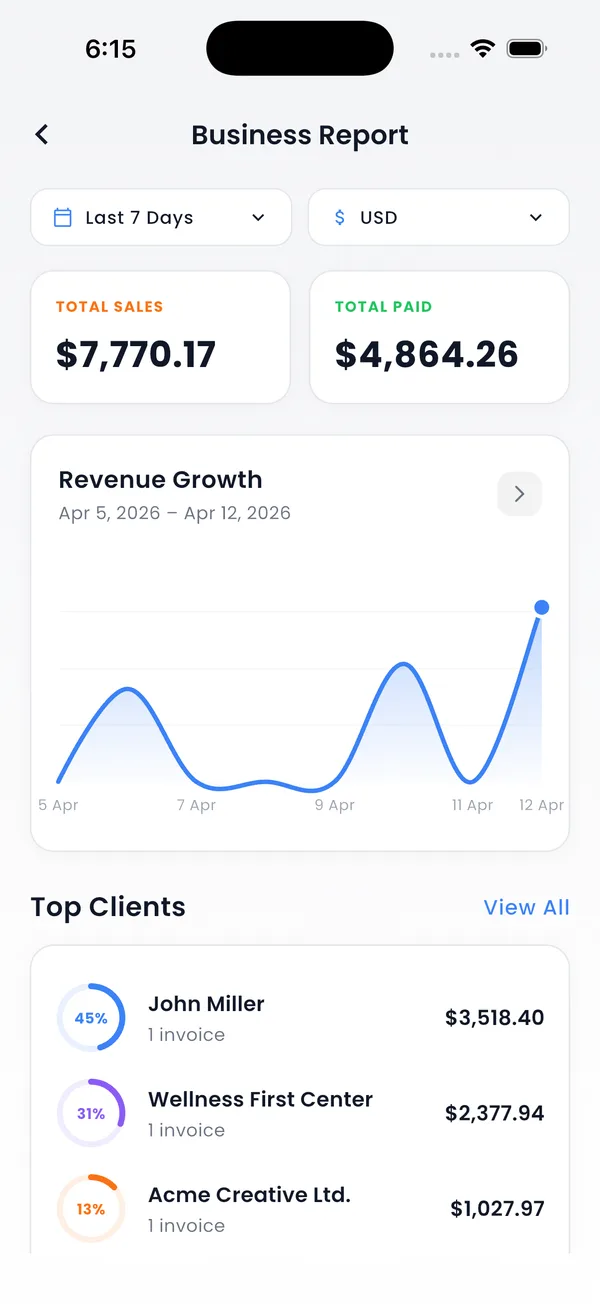
Step 4: Reports your accountant will use
At tax time or month end, generate business reports directly from your invoices: revenue over time, sales by client, and sales by item — exportable as PDF. You can also back up all your data as a ZIP file for safekeeping or for moving to a new phone.
Keep your business data yours
PocketInvoice stores everything locally on your device. There's no account, no cloud upload, and no third party holding your client list and revenue numbers. For a small business, that means zero risk of your billing data leaking from someone else's server.
The one-minute daily workflow
- Finish a job → create invoice from saved client and items.
- Send the PDF by email or WhatsApp on the spot.
- When money arrives, mark it paid (or record a partial payment).
- Friday: glance at the unpaid list and nudge anyone overdue.
Set up your business in 5 minutes
PocketInvoice is free to start — business profile, clients, items, and your first invoice today.


FAQ: Small business invoicing
What is the best invoice app for a small business?
The best fit depends on your workflow, but for most small businesses the essentials are speed, professional templates, payment tracking, reports, and data privacy. PocketInvoice covers all five, works offline, and is free to start.
Can I manage more than one business?
Yes. PocketInvoice supports multiple business profiles, each with its own name, logo, and details. You choose which business an invoice belongs to when you create it.
Can I export reports for my accountant?
Yes. Generate revenue, sales-by-client, and sales-by-item reports as PDFs, and export your full data as a ZIP backup.
Can I add tax rates to invoices?
Yes. Save any named tax rates you use (sales tax, VAT, GST) once, and apply them to items on any invoice. The app calculates totals automatically.