GST Invoice App: Create GST Bills on Your Phone
With PocketInvoice you can make GST invoices on your phone in seconds: add your GSTIN to your business profile, save your tax rates once (GST, CGST, SGST, IGST, or VAT), and they appear on every bill. Works in ₹, fully offline, and shares straight to WhatsApp.
What a GST invoice needs
A standard GST invoice generally includes:
- Your business name, address, and GSTIN
- A unique invoice number and date
- The customer's name and details
- Description of goods or services with quantities and rates
- The tax rate applied and the tax amount
- Total amount payable
Requirements vary by registration type and turnover — when in doubt, confirm the exact format with your CA. PocketInvoice covers the fields above out of the box.
Set up GST in PocketInvoice once
- Add your GSTIN: open your business profile and enter your GSTIN in the tax number field — it then appears on every invoice you create.
- Save your tax rates: create the named rates you actually use (for example GST 5%, GST 12%, GST 18%, or CGST and SGST as separate rates) — one time, reusable on every bill.
- Set ₹ and date format: pick Indian Rupee and your preferred date format in settings.
Make and send a GST bill
- Create a new invoice and add the customer.
- Add items — apply the right saved tax rate per item; totals calculate automatically.
- Pick a template (structured layouts show tax columns clearly).
- Share the PDF straight to WhatsApp, email, or print it.
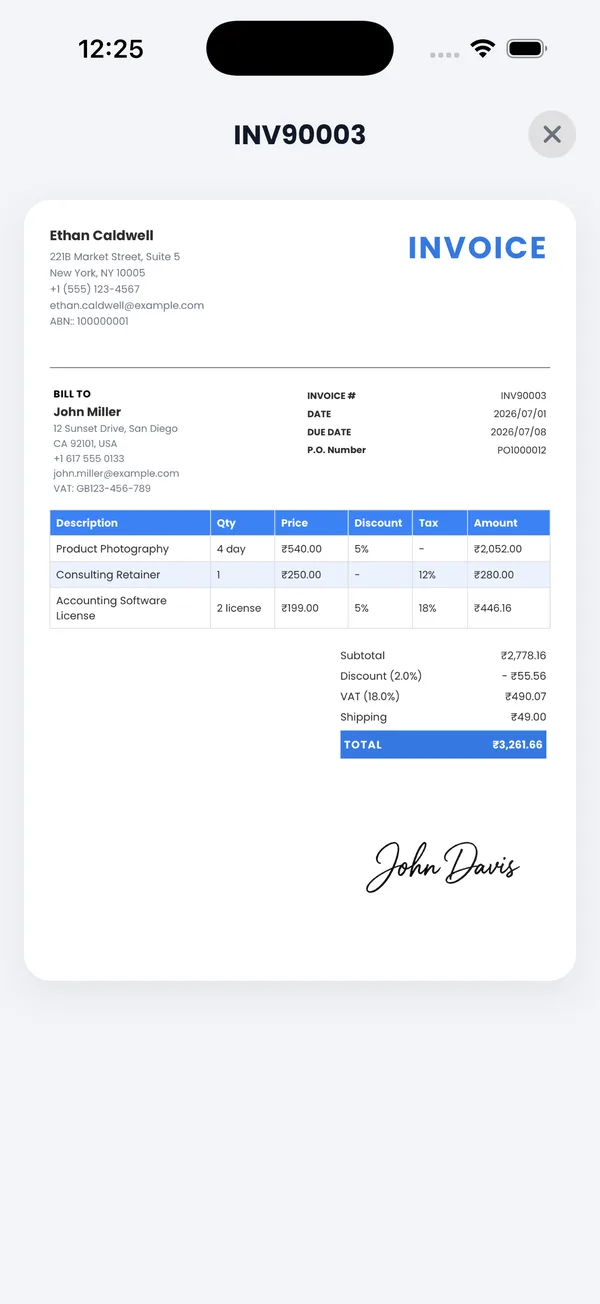
Works offline — made for shops and field work
PocketInvoice needs no internet and no account: bill customers during network outages, at exhibition stalls, or on service calls. Everything stays on your phone like a digital bill book. The app interface is available in Hindi and 21 other languages, and your invoices are generated in clean, professional English.
Track every bill like a digital bill book
Every GST bill you create is tracked automatically: paid, unpaid, partially paid, and overdue, with totals at the top of your list. Record part payments as customers pay, set due dates so the app reminds you to follow up, and pull sales reports by customer or item whenever you need them for bookkeeping.
Make your first GST bill today
PocketInvoice is free — GSTIN on every invoice, saved tax rates, ₹ billing, WhatsApp sharing.


FAQ: GST invoicing
How do I add my GSTIN to invoices?
Enter your GSTIN in the tax number field of your business profile in PocketInvoice. It then appears on every invoice and estimate automatically.
Can I use CGST and SGST rates?
Yes. Save any named tax rates you need — GST, CGST, SGST, IGST, or VAT — and apply them to items on your invoices. Ask your accountant which breakdown applies to your billing.
Can I send GST invoices on WhatsApp?
Yes. Export the invoice as a PDF or image and share it directly to WhatsApp from the share sheet — the most common way Indian businesses send bills.
Does it work in Hindi?
The app interface supports Hindi and 21 other languages. Invoices themselves are generated in English, with amounts in ₹ and Indian date formats.