Invoice Maker for Contractors: From Job-Site Estimate to Paid Invoice
Contractors lose billing time between the job site and the office. With an invoice maker like PocketInvoice you write a photo-backed estimate at the site, get approval, convert it to an invoice in one tap when the work's done, and track payment — all from your phone, fully offline.
Estimate at the job site, not at home
Walk the job, then build the estimate while you're still standing in front of it: line items for labor and materials, quantities, and your rates. Attach photos of the site directly to the estimate — the damaged fence, the panel that needs replacing — so the client sees exactly what the price covers. Clear scope up front means fewer disputes later.
No signal in the basement or out at a rural site? Doesn't matter. PocketInvoice works completely offline; share the estimate whenever you're back in coverage.
Convert the estimate to an invoice in one tap
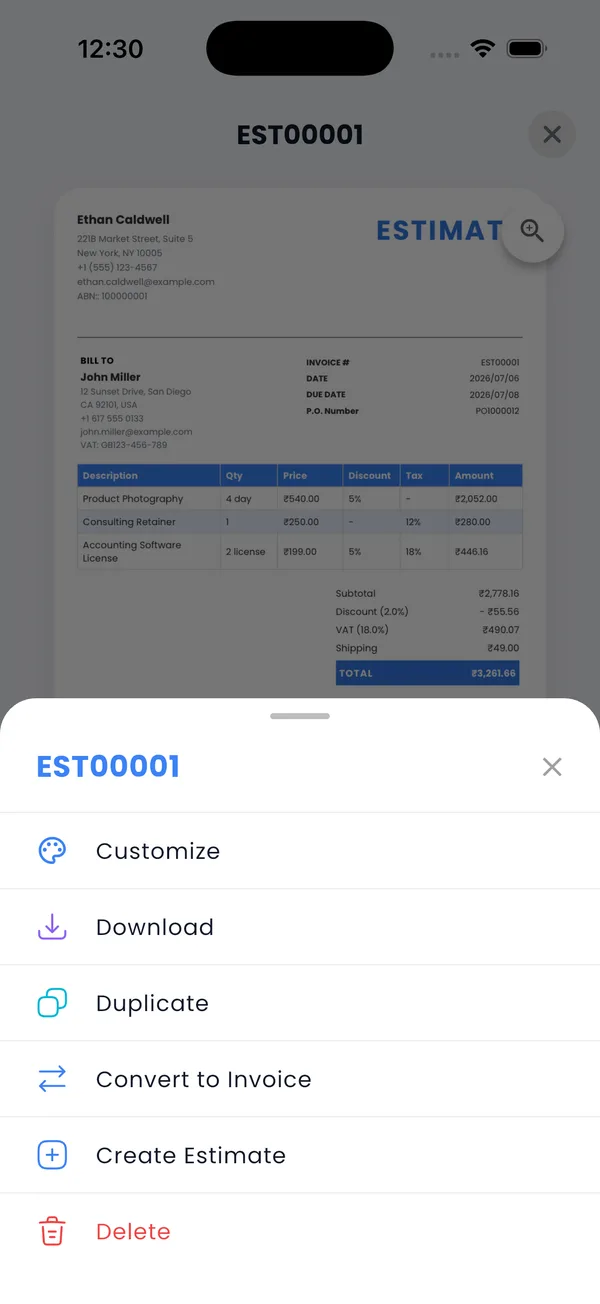
When the job is approved and done, don't retype anything. Open the estimate, convert it to an invoice, and every line item, rate, and client detail carries over. Adjust for any change orders, add your signature, and send the PDF before you leave the driveway.
Handle deposits and progress payments
Contract work rarely gets paid in one lump. PocketInvoice records partial payments against an invoice — take a deposit up front, log it, and the invoice shows the remaining balance. The status moves from unpaid to partially paid to paid, so you always know where each job stands.
Get paid faster with fewer questions
- Professional templates make a one-person operation look established — structured layouts fit trades well.
- Itemized lines with tax answer "what am I paying for?" before it's asked.
- Due dates and reminders keep follow-ups from slipping through the cracks.
- Payment methods on the invoice tell the client exactly how to pay you.
Built for how contractors actually work
Everything happens on the phone that's already in your pocket: no laptop, no office software, no account to log into with gloves on. Client list, item prices, estimates, invoices, and payment history — on your device, available offline, backed up whenever you export a ZIP.
Estimate the next job from your phone
PocketInvoice is free for contractors — photo estimates, one-tap invoicing, offline everywhere.


FAQ: Contractor invoicing
Is there an invoice app that works offline at job sites?
Yes. PocketInvoice works completely offline — create estimates and invoices with no signal, and share them when you're back in coverage. All data is stored on your device.
Can I add photos to a contractor estimate?
Yes. Attach photos of the job directly to your estimate so the client sees exactly what the price covers. It speeds up approvals and prevents scope disputes.
How do I handle deposits and partial payments?
Record any payment against an invoice and PocketInvoice tracks the remaining balance, marking the invoice partially paid until it's settled.
Do I have to retype an estimate to invoice the job?
No. Convert any estimate to an invoice in one tap — all line items, rates, and client details carry over.