How to Give a Customer a Receipt from Your Phone
The simplest receipt for a small business is a paid invoice: create the invoice in PocketInvoice, mark it paid, and share the PDF — it shows the amount, date, and paid status your customer needs as proof of payment.
What actually counts as a receipt
A receipt is proof that payment happened. At minimum it shows who paid, who got paid, what for, how much, and when. A paid invoice contains every one of those — which is why "send me a receipt" is usually solved by sharing the invoice again once it's marked paid.
Make a receipt in 4 steps
- Create the invoice in PocketInvoice (or open the existing one for the job).
- When the customer pays, mark it paid — or record the payment amount and date.
- The document now carries its paid status.
- Share the PDF with the customer — that's their receipt, filed and dated.
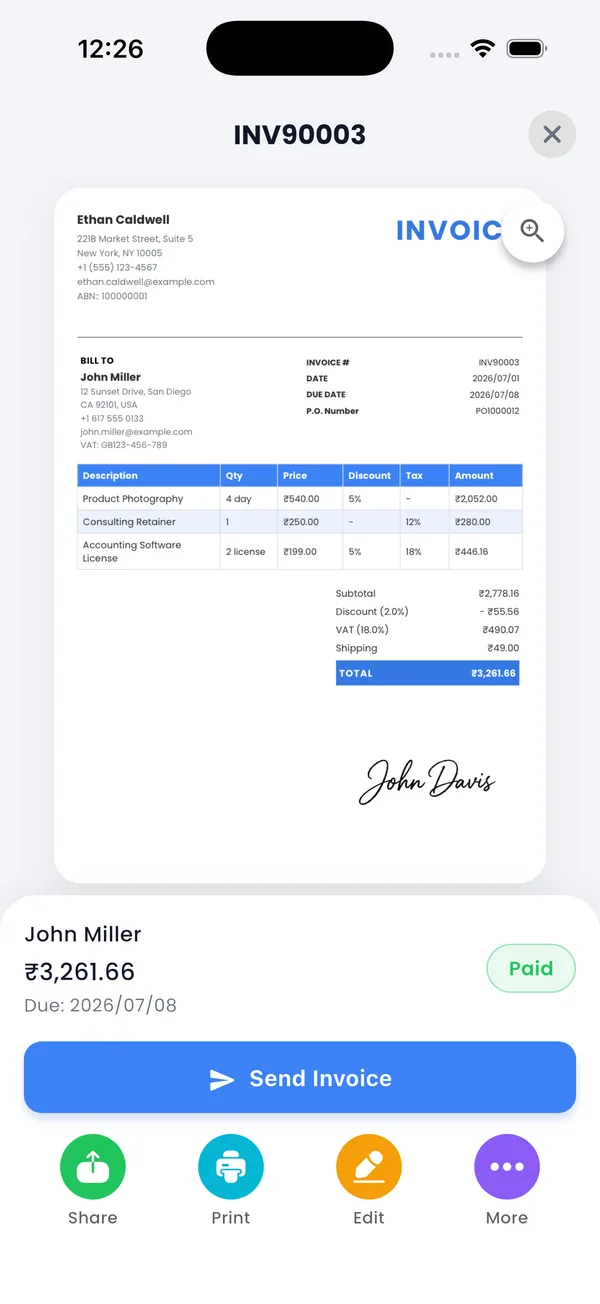
Selling on the spot? Invoice and mark paid together
For over-the-counter or cash-in-hand sales, create the invoice and mark it paid immediately — the customer gets their receipt by WhatsApp or email before they've left, and your records show the sale with zero extra bookkeeping.
Partial payments leave a clean trail
When a customer pays in installments, record each partial payment as it arrives. The invoice tracks amount paid versus balance due, so at any point you can show the customer exactly where things stand — and the final paid document confirms the job is settled.
Receipt vs invoice, in one line each
- Invoice — a request for payment: "here's what you owe."
- Receipt — a confirmation of payment: "here's proof you paid."
Keep every receipt findable
Because receipts are just your paid invoices, they're already organized: filter the invoice list by paid status, pull sales reports by client or item, and export everything as a backup. When a customer asks for a copy months later, it's three taps away.
Send receipts customers can keep
PocketInvoice is free — invoice, mark paid, and share the PDF receipt in seconds.


FAQ: Receipts
Is a paid invoice a valid receipt?
For most small business purposes, yes — it shows payer, payee, items, amount, and date, which is what proof of payment requires. If your industry has specific receipt rules, check the local requirements.
Can I make a receipt without an invoice?
The fastest way in PocketInvoice is to create the invoice and mark it paid immediately — one document that serves as both the record of sale and the receipt.
Does my customer need the app to receive a receipt?
No. They receive a normal PDF or image by WhatsApp, email, or any share option — nothing to install.
Is the receipt maker free?
Yes. Creating invoices, marking them paid, and sharing the PDF are all part of PocketInvoice's free plan.